You’ve probably noticed it’s German/Austrian cooking week here at Awesome Toast. It’s my favorite cuisine, and definetly my favorite to cook. Another favorite recipe of mine is German potato salad. It’s very different from American potato salad, with a sweet vinegar type glaze and is typically served warm. Here’s my recipe:
The Stuff:
3 cups peeled potatoes, sliced. I prefer Yukon Gold or Red potatoes.
4 tbsp of butter OR 4 strips of bacon (see below)
1 small onion, diced
2 cloves of garlic, minced
1 teaspoon salt
1/4 cup white vinegar (just a little less than that, actually)
2 tablespoons water
2 tablespoons white sugar
1/8 teaspoon ground black pepper
1 tablespoon chopped parsley
Making it Happen:
Place your sliced potatoes into a pot, and fill it with enough water to cover them. Bring to a boil, and cook for about 10 minutes, or until easily pierced with a fork.
While that’s going, melt the butter in a deep skillet over medium-high heat. (For the less healthy but even tastier version, fry your bacon, then remove it and use the remaining bacon grease. Chop the bacon up and add it in later.)
Add your onion and garlic to the butter or grease, and cook over medium heat until browned. Then add the water, vinegar, sugar, salt and pepper. Bring the mixture to a boil, then add the potatoes and parsley. If you used bacon, add that now. Reduce heat and stir occasionally for about 1-2 minutes. The starch from the potatoes will cause the sauce to thicken into a glaze. Serve warm and enjoy!
Käsespätzle (or homemade egg noodles with cheese) is one of my all-time favorite Austrian/German recipes, and one of my favorites to make. Here’s my recipe!
You’ll want to start the caramelized onion topping first, as it takes the longest.
Caramelized Onions
1 tbsp butter (not margarine)
2 Onions (preferably sweet like Walla Walla, but others work fine too)
1/4 tsp salt
Melt butter in skillet over med-high heat. Stir in sliced onions until they’re covered, then cook for 10 minutes. Stir every 3 mins or so.
Then sprinkle the salt over them (and a tsp of brown sugar if you have tangier onions) and reduce heat to med-low. Cook for 30-40 minutes until they are golden brown and a little crispy looking.
Spaetzle
While the onions are going, grab a large bowl and this stuff:
4 large eggs
2 cups all purpose flour
1 1/2 tsp salt
1/4 tsp pepper
1/4 cup milk
At least 2 cups of your favorite cheese(s), grated
Start a pot of water boiling. I use an average-sized sauce pot filled just over 3/4 full, and with a little salt. Add a little butter or oil to the water (to keep the noodles from sticking together)
Beat the eggs soundly, then add the milk, then add all the remaining ingredients except the cheese. Mix the batter well. It will be thick. Set your spätzle hobel or a colander on top of the pot, and scrape about 1/4 of the batter in. Spread the batter across the hobel or colander with a spatula so it falls out the bottom in little bits. When the bits rise to the top, they’re done. It won’t take long. Scoop them out into a bowl or casserole dish with a slotted spoon and repeat until your batter is gone.
Once your spätzle are done, dial your oven to 350°, then layer the spätzle in a casserole dish with your cheese. I usually do 2-4 layers, ending with cheese on top. My favorite spätzle cheeses are Gouda, Appenzeller, and Gruyère, but you can get excellent results with Cheddar and Colby Jack as well.
Bake the spätzle for about 15 minutes. The point is simply to get the cheese and noddles melted together and make the top a little toasty. You can bake it longer for a crispier top if you’d like. When it’s done, serve with the caramelized onions on top.
If you’ve ever finished a course or class that was really hard to follow, didn’t seem to deliver, was either too easy or too hard — it’s possible that poor instructional design (ID) is to blame. The opposite is of course, also true.
Basically, ID is a set of rules or a process for making training/classes do what they’re supposed to do. With it, we:
Determine our goals with the instruction. (You do have them, don’t you?)
Focusing on meeting those goals efficiently, meaning we try not to waste time, but don’t try to go too fast.
Measure to see if our goals have even been reached, both at the end and along the way.
Recognize that “Teach students X” or “Help students understand Y” or “Put students through a grueling, 14-week course of Z” are not appropriate goals.
Keep SWABAT in mind. (Students Will Be Able To)
ID has some advantages over simply dubbing someone a teacher and setting them loose to spew forth their alleged knowledge. Some of them are:
Analysis of whether to teach at all. (Believe it or not, education isn’t always the answer to a given problem.)
Cost effectiveness. In the long run, ID can make for more, better-educated, happier, less-bored, and more-capable students in the same amount of time.
It’s time effective. ID helps meet the right need of the right people at the right time.
This can lead to a competitive advantage. In fast-moving industries, good training is a valuable asset. For schools and universities, it’s plays a huge role in your credibility, respectability, and therefore, funding.
Consistency. Standardized, proven methodologies produce consistent quality results.
“Wow. So, there really aren’t any downsides,” you say. Well… not exactly true. In the short term, ID can take more resources, require more/different people than what you have, and involves more steps. But if you’re willing to pay the price, you’ll get results. Even a marginal application of ID principles can yield big differences in student wishing-they-would-enter-a-coma-rather-than-be-in-your-class-for-just-five-more-minutes-ness.
We discussed user testing in Intro to Instructional Design last week, and how testing your product or instruction with just one user can dramatically improve your product’s usability and effectiveness.
I found it interesting that around the same time, Google announced the Google Website Optimizer. At first, it sounds like this is made to make your site load faster or somesuch, but it’s actually much more than that. GWO is a free tool for conducting experiments and testing conversion rate — which essentially is the percentage of the time your visitors actually do what you want them to when they come.
The cool thing is that it lets you move things around on your page, for example, and it randomly serves up different versions of your site to people who visit. You can then look very closely at the data and see which variations of your page are proving most effective. The other great thing is that it tests both your target audience and people outside it.
I can think of a few ways this could prove very useful on our school’s websites. If you want to know more about it, check out A Beginner’s Guide to Google Website Optimizer on Kissmetrics.
Tags:
flash, html, photoshop, splash, usability, user interface, web
Not that many people are even doing this these days, but I just ran into a couple of them and suddenly feel it’s worth mentioning again. Splash pages are pure evil.
(Okay, maybe not pure evil. But some kind of evil, for sure, even if it’s just the annoying kind.)
What is a splash page, you ask? You’ve probably seen them. It’s a sort of front door to a website, and they are often made with Flash. Here’s an example:
The splash page on www.takeshape.it, a good example of a not-quite-so-good idea. (Sorry, guys.)
Pretty, right? Well, yes. But why is it there?
The lure of a splash page is that it gives us a chance to show off. It’s like saying, “Look, we’ve made some really cool stuff in Photoshop,” or, “Check out this excellent Flash animation!” What better place to show the world what we can do than right off the bat at the front of our site, right?
Wrong. Think about other sites you’ve visited. Why did you go to that site? Probably because you wanted something—because you had a question you wanted answered, or you wanted to see someone’s artwork or photos, read some articles, or contribute to a forum or community. Maybe we’ve visited Take Shape to look at some of their fine abstract patterns.
Does a splash page help us do any of that? We want patterns, or whatever, not another reminder of where we already know we are. Splash pages usually offer no other options than to “skip intro” or “enter the site”. Isn’t that what we were already trying to do when we entered the URL or clicked on a link?
It’s the same with our visitors. They didn’t come to be wowed by a fancy introduction. They came for a reason, and they want to get to it without any unnecessary interruptions. (Especially on the 2nd, 4th, and 8th visits, if you can get them to come back at all.)
Famed web usability expert Jakob Nielsen had this to say about splash pages:
Splash pages are useless and annoying. In general, every time you see a splash page, the reaction is ‘oh no, here comes a site that will be slow and difficult to use and that doesn’t respect my time.’ Source: Readers’ Comments on the new Top-10 Design Mistakes.
Furthermore, when splash pages are made with Flash, the opportunity for frustration (and people immediately leaving your site) increases even more. There’s nothing like browsing the web late at night in the dark, or in a quiet study hall or library, and then suddenly have some designer’s favorite rap song blast through your speakers at full volume. And the potential issues go well beyond the inappropriate use of sound. Jeff Noble of the usability blog User Interface Trends makes a good point about animation:
Animation just because you can do animation, like it’s possible or whatever, is very very bad. Please stop. Visitors come to a website for information, not to learn how awesome you are in vague generalities and exploding 3d text. Kaboom!
If you know Flash, create something useful or appropriately entertaining, not a fancy splash page that will only drive users away. We make websites because we want visitors. Don’t give them reasons to avoid your site.
Oh, but there’s always a catch.
That said, there are very rare and specific cases in which a splash page can be useful. If you think you might be dealing with such a case, I’d recommend checking out these two posts by Smashing Magazine, Splash Pages: Do We Really Need Them? and Exploring Design: Outstanding Start Pages. Also, there’s Jakob Nielsen’s dated but still fairly relevant, Flash: 99% Bad.
Though it can be easy to think otherwise, web design is much more than just putting content on a site and calling it a day. And, because people interact differently with the web than with printed materials such as newspapers and magazines, we can’t treat it the same when we design for it. There are many facets to good web design, and this article is about one of the most important we need to think about when we design.
The Interface
Because the Web is so vast, it would do us well to remember Jakob’s Law. Coined by Jakob Nielsen of Web Usability fame, it states: “Users spend most of their time on other sites.” What this means is that users expect your website to work and behave in a similar way to the ones they already know.
Let me illustrate this point with a corporeal example: Imagine you borrow your friend’s car. You climb in, try to put in the key, and find that the ignition is not where you expect it to be. Instead of going in to the right of the steering wheel, you eventually discover that the key goes on the left side. You get the key in, and it doesn’t turn. After a minute of fiddling with it, you find out that it doesn’t turn clockwise, but counterclockwise—and you have to push on it first.
Well this is all pretty irritating, now isn’t it? And we’re only getting started! It turns out that the turn signal isn’t a lever on the left of the wheel, but a button on the wheel itself. The radio volume is controlled with a button on the floor by the pedals, and the windshield wipers are turned on an off from where the radio volume is supposed to be.
This is one aggravating car, isn’t it? Who designed this thing, anyway?
Someone who hasn’t driven many cars, apparently. You see, car designers might think the key would work better in a different place, but they never move it because no one would buy their annoying, hard-to-use cars if they did.
Don’t Confuse Your Visitors Away
You can probably see where I’m going with this. Though not quite to the same extent, websites are similar to our car. Think about some of the sites you’ve visited recently. I’d be willing to bet that the site’s logo was in the top left corner, and if there was a search box, that it was somewhere near the top, or around the upper-right corner. And I’ll bet colored words were almost exclusively links. I don’t even have to know what sites you go to to guess that because websites, like cars, have developed certain trends. Like it or hate it, if your search box is on the left side of the page at the bottom of the screen, a lot of people won’t even know you have one, and they’ll wonder why you don’t. After all, as Vitaly Friedman of Smashing Magazine says in this post, “if users can’t use a feature, it might as well not exist.”
Now imagine that your friend’s weird car is just one of millions you could be driving instead. (You’re famous, because everyone in the state wants to lend you their car.) Do you think you’d spend more than a few seconds in our problematic example one, or would you be in another, more familiar one in seconds? Like you and your millions of cars, web users have millions of websites they could be at instead of yours, and they won’t stand much in the way of confusing or frustrating layouts.
Try to avoid being the cause of this situation. And don’t try this at home.
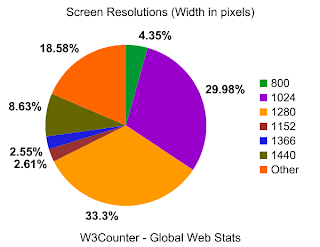
One way to avoid this making your site awkward or hard to use is to take some time to look at other sites with similar messages to yours. Because you’ll likely share your audience with those sites, you can get an idea of how your specific user base might expect your site to work. Additionally, you can do a search for web usability statistics and get some cold, hard numbers, like those from the W3Counter and Internet Usage World Stats. For instance, you would not want to design your site to be wider than 1440 pixels, because only a small percentage of web users have screens that wide according to global web statistics:
Source: www.w3counter.com/globalstats.php. Accessed Nov 17, 2009
But, you’re saying I can’t be creative!
No I’m not. Really, you can. You have a lot more flexibility than our awkward car above—the Internet isn’t nearly that fixed in its ways. And remember, we’re talking about how your site works, not how it looks. Cars all pretty much work the same, but they come in all kinds of different shapes, sizes, styles, and colors. And so should websites. The Internet would be a pretty boring place otherwise.
Last week’s discussion about visuals and interfaces really got me thinking about user interfaces. One of the biggest and most important challenges of user interface design is to organize your information in the best possible way—you can’t just put it on the screen and assume your visitors will know what to do with it.
Reading on the Web is Different
For instance, studies show that the majority of web users don’t stop to read every word on the screen. (See this sample chapter from Don’t Make Me Think by Steve Krug.) They read hard and fast, skimming more than anything. Therefore, if you want people to actually digest your information, you need to make it as easy to read and as well organized as possible. As the Web becomes more prevalent in all our lives — and those of your learners — I imagine this habit of skimming might easily apply to all forms of on-screen text, be it a web site, educational software, or Internet-based instruction.
Images Should Make Sense
Images should also be chosen carefully. Images do not typically, by themselves, convey meaning — at least, not the meaning you’re trying to get across. I once dealt with a client who insisted that the website I was creating for his event be dominated by two pictures: a handful of bullets on a book, and a globe painted on someone’s hand. I had to explain to him, that although these pictures were nice to look at—they didn’t say a single thing about what the event was, or why people should care about it enough to bother attending. It was the words that communicated our message, and the images were the garnish. You don’t go to a restaurant to enjoy the parsley with a small side of entree.
For a good article about using images on the web, check out this post by Nasir Mehmood.
Media is not a replacement for quality instruction.
Media is interchangeable; method is not.
Media are delivery vehicles for instruction and do not directly influence learning.
Media are not directly responsible for motivating learning.
Therefore, expensive media are uneconomical, because quality instruction could easily be delivered in a different and less expensive way.
Kozma argues that media are in fact important tools in instruction, worth the cost (when employed correctly), and that the use of media and technology does indeed have a tangible benefit on learning.
I was assigned to argue on the Clark side of things, and at first I was less than thrilled. Simply by reading the titles of the two author’s papers, I knew I agreed — strongly, even — with Kozma. But now, I’m not so sure. Clark does make some very interesting points. Considering the cost of media and computers, are we really getting our money’s worth in improved instruction? I’m not so sure we are.
Media and Motivation
On the other hand, I take issue with point #4 above. From my own experience, I have found this to be somewhat untrue. For over a decade, my father tried to get me to use a planner. He said it would improve my ability to keep on task, complete homework, and be on time. And he was right. I knew he was, so I let him get me one. Except — it never worked. I went through several planners in different sizes and shapes, and not one of them got used more than a day. It wasn’t until I got myself a Handspring PDA that suddenly things began to work. I found I actually used the thing. Not long later, I was able to use a program called AvantGo to have things from the Internet right in the palm of my hand. And, I started learning things. I read articles about the subjects that interested me — simply because I could. The media let me choose my own terms for learning, and my motivation increased. I was able to learn when I wanted to, when I felt I had the cognitive abilities to do so. Since then, things haven’t changed much. For years, I have almost always had my headphones on, but most of the time it’s not to rock out — I burn through podcasts like crazy. I review class lectures. I look up words and terms I don’t fully understand, and I take notes. I work on school projects anytime, from anywhere. Even collaboratively.
My first portable learning device: the Handspring Visor
Would I have learned as much as I have over the past 10 years without these media — if my learning was confined to heavy books, lectures to classrooms only given at certain times, whether my brain can handle them or not? I’m not so sure I would. These media have given me more motivation to learn because they let me do it on my own terms. I choose to learn all the time now, simply because I can. And the novelty has yet to wear off.
In The Middle
What about the rest of the argument? There are other points of Clark’s that I take some minor issue with, and some I definitely agree with. Same with Kozma. I feel that, from my own experience, they are both right. When done correctly, I do believe that computers and media can provide educational experiences well above the norm. But not always, and not for everyone. As with most of life’s great debates, I think the truth is somewhere in-between.
Last week we discussed the importance of developing assessments appropriate for the instruction we create.
During the lecture, I realized that often, a certain assessment may be assessing more than what I think it is going to. I spaced out (sorry, Prof. Monson) and started thinking about the math assessments I took while in school. Usually, I was assessed on my knowledge of, say, equations — but I was also assessed on my reading comprehension. If I’d had a conversation with my teachers, I imagine that they would not have listed reading comprehension as one of the things they were intending to test for by giving story problems on a math test. However, lengthy math story problems that contain the bulk of important information necessary for the task embedded in written context are really testing a student’s ability dissect the story problem and translate it into numbers before they ever use math. If a teacher gives story problems on a test without delivering enough instruction on reading comprehension necessary for the assessment (or ensuring that they get it somewhere else, like another class, at the same time), then they are, in fact, testing on something they did not teach.
This perspective on assessments is important when designing instruction in all kinds of instructional situations. Since instruction designed with assessment in mind, it is important to carefully select the assessment intended for use and analyze what is truly being assessed. If the assessment chosen requires instruction that we do not intend to give, then a different assessment should be chosen. Or, if it requires certain background knowledge, then the instructor should verify that the students have the knowledge necessary to do the assessment before it is given.
An example of this in media would be designing a message board for students to post responses to an assigned article. The intention is to test on what the students were supposed to have read, sure. But what we’re also (and likely without knowing it) testing on their ability to use a message board. (We could go farther, to the point of “well, duh” and add Internet connection and usage, basic computer skills, and school skills.) So the possibility exists that, before students are able to complete the task, instruction on how to use the message board should be considered. Or at the very least, we should know if they’ve already learned about message boards and make sure that those who can’t use them get trained. While this kind of instruction may not be part of the intended learning outcomes of the class, it is still part of the instruction because it is part of the assessment given.
Does this sound familiar? It’s an interesting throwback to the analysis phase of our instruction where we figure out what students already know and how to build on it, or what they need to know before we can give them our instruction. Especially when considering how to build appropriate tests, that phase seems all the more important now.
This was a forum posting for one of my classes. My response started becoming so long that I decided to put it here. After all, it’s a question worth exploring. Here’s the full question:
Do we need technology to reach today’s learners? Is a chalk board enough? How did we ever learn before the computer?
I would say yes, we do need it — but not necessarily because low-tech methods don’t/didn’t work. Just look at some of the advances made by humanity prior to 1960. Clearly, people were quite capable of learning before computers invaded the classroom.
I say yes mostly because of student expectations today. Today’s students were likely born in an age where there were never not computers, video games, and the Internet. Technology surrounds them in every aspect of their lives. It’s comfortable and familiar to them. There was never a time that it didn’t permeate their lives.
With the age gap widening, and technology becoming ever more important in almost every professional field, students are becoming increasingly confused and/or disillusioned when instructors avoid bringing it into the classroom. From my own experience with higher-ed students, the teachers that try to avoid technology are seen — at least to a degree — as bring outdated paper-wasters that are out of touch with the world that today’s will have to live in. I’ve heard many comments to the effect of, “Duh! Why do I have to turn this in on paper? Do they even know that email exists?” I’ve also seen instructors roll out overhead projectors and heard a quiet chorus of snickers and seen a wave of eye-rolling. Student engagement in these courses was often unimpressive.
That’s not to say that what Dr. Overhead Projector had to teach wasn’t perfectly relevant/interesting/useful. He/she often had plenty interesting information to offer, but the impression made by his/her avoidance of technology turned students off quicker than a power-outage. Most of these students were in their early to late 20s. Many of them had lived before the advent of the Internet. How will students born after the Web respond to all-paper classrooms, overhead projectors, chalkboards and pencil sharpeners?


 You’ve probably noticed it’s German/Austrian cooking week here at Awesome Toast. It’s my favorite cuisine, and definetly my favorite to cook. Another favorite recipe of mine is German potato salad. It’s very different from American potato salad, with a sweet vinegar type glaze and is typically served warm. Here’s my recipe: